When cleaning is likely to be worthwhile
There is no honest universal cleaning interval. A tower on a hard desk in a smoke-free room with filtered intakes can remain clean far longer than one on carpet near pets, renovation dust, cooking vapour or tobacco smoke.
Inspect and consider cleaning when:
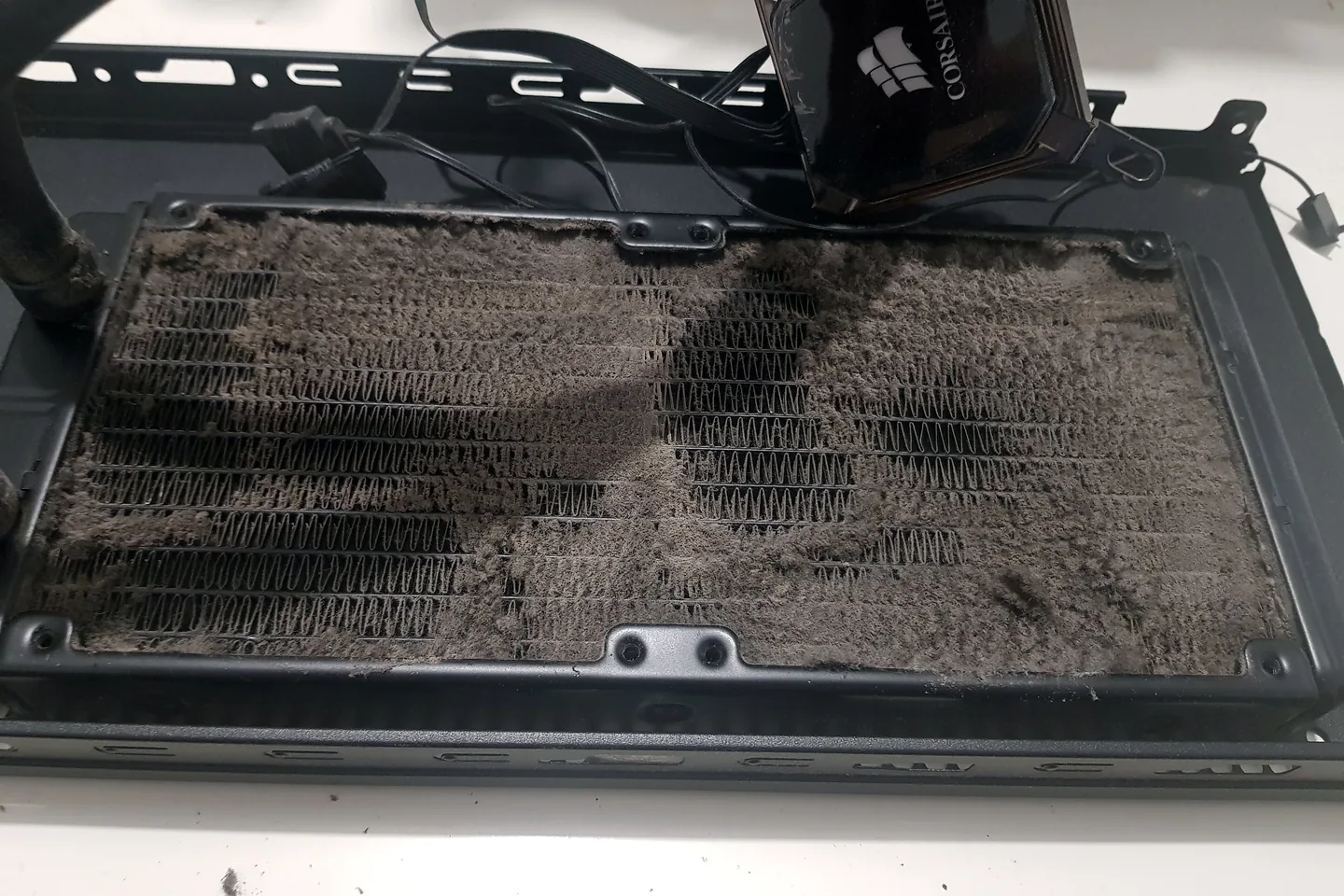
- Dust mats are visible on filters, heatsinks, radiators or fan blades.
- Fans run faster or louder during the same familiar workload.
- Temperatures or clock behaviour have changed from a known baseline.
- The PC throttles, crashes or shuts down during gaming.
- An intake filter is blocked or a fan has stopped.
- The case has been stored or used in a dusty environment.
- A component upgrade exposes severe buildup or obstructed cable routing.
Dust can restrict airflow and insulate heat-exchange surfaces, but not every hot PC is dirty. Incorrect cooler mounting, pump failure, fan control, old thermal material, restricted case design and software load can produce similar symptoms.
What a safe basic desktop clean involves
- Shut Windows down fully, switch off the power supply where applicable, unplug the mains cable and disconnect peripherals.
- Move the PC to a suitable ventilated work area and follow electrostatic-discharge precautions.
- Remove accessible filters and clean them according to the case maker’s instructions.
- Use controlled compressed air suitable for electronics. Hold fan blades so they do not overspeed when air is directed through them.
- Blow dust out of heatsink fins, radiator surfaces, case vents and accessible fan frames rather than driving it deeper into the system.
- Use a soft anti-static method for stubborn dry debris. Do not spray liquid directly onto components.
- Reassemble, reconnect and confirm that every expected fan and pump operates.
Dell’s maintenance guidance warns against using a vacuum or blower that can create static, recommends powering off and unplugging the device, and says never to spray liquid directly onto the computer.
What should never be included in casual cleaning
- Do not open a power-supply unit. Internal capacitors can retain hazardous energy even after disconnection. Clean only the external grille or replace/assess the PSU when needed.
- Do not let fans spin freely at extreme speed. Control the blades while using compressed air.
- Do not use a household vacuum directly on components. Static and physical contact create risk.
- Do not spray cleaners or compressed propellant liquid onto boards.
- Do not wash electronic parts. Case filters may be washable only when the case manufacturer permits it and they are completely dry before refitting.
- Do not disturb a custom liquid-cooling loop without a plan. Fittings, pumps, coolant condition and leak testing require extra care.
Dust removal is only one part of airflow
Air needs a clear route into the case, through hot components and out again. A perfectly clean tower can still run badly if intake fans are reversed, a front panel is highly restricted, cables obstruct a small cooler, radiator fans oppose each other, or the case is trapped inside a closed cabinet.
Airflow checks should consider:
- Which fans are intake and which are exhaust.
- Whether filters are installed on the actual intake path.
- Clearance around front, bottom, rear and top vents.
- Fan speed and direction under load.
- Radiator placement, pump reporting and liquid temperature where available.
- Whether one component is recycling another component’s hot exhaust.
Adding more fans is not automatically better. Uncontrolled turbulence, noise and conflicting airflow can result. The configuration should suit the case and measured heat load.
Does cleaning mean the thermal paste must be replaced?
No. Thermal paste fills microscopic gaps between a processor and its cooler. It should be considered when the cooler must be removed, contact is suspect, the material is clearly compromised, or measured behaviour supports a thermal-interface problem.
Replacing paste without evidence introduces risk: mounting pressure can be uneven, the wrong amount or material can be used, nearby pads can be disturbed, and a working cooler can be reinstalled badly. On graphics hardware and laptops, thermal-pad thickness and component coverage can be model-specific.
A cleaning service should explain whether the cooler was removed and why. Dust removal alone should not be sold as proof that paste replacement was necessary.
Why before-and-after thermal testing matters
The objective is not a photograph of a clean case. Record idle and load behaviour under a repeatable workload before cleaning when the system is stable enough to test. After reassembly, repeat the same workload and compare temperature, fan speed, clock stability, noise and any previous crash or shutdown.
Model and room conditions matter. A lower temperature is useful only when the workload, fan profile and ambient conditions are comparable. A system can also be quieter at the same safe temperature, which may be a valid improvement.
If cleaning does not change the fault, continue diagnosis instead of claiming the dust was the cause. Cooler mounting, pump function, power, memory, drivers and application load may still need testing.
Gaming-PC cleaning decision table
| Condition | Basic clean may be enough | Diagnosis is also needed |
|---|---|---|
| Light dust on filters, stable temperatures | Yes, routine filter and vent care | Only if another symptom exists |
| Dust packed inside heatsink fins | Cleaning is necessary | Retest cooling under load |
| One fan does not spin or makes bearing noise | No | Fan control, cable or replacement assessment |
| PC shuts down while gaming | Cleaning may help | Power, cooling and stability diagnosis required |
| Temperatures rose after a cooler change | Dust is not the main clue | Mounting, pump, fan and firmware checks |
| Custom liquid loop has residue or leak signs | No casual clean | Specialist inspection and leak-safe handling |
| Clean PC remains slow | No further cleaning benefit | Check workload, storage, memory and software |
What a useful professional gaming-PC clean should include
- Record the complaint and confirm whether the machine is stable enough for a baseline test.
- Inspect filters, heatsinks, radiators, fans, vents, cable routing and signs of contamination.
- Power down, isolate mains power and control electrostatic and fan-overspeed risks.
- Remove dust without opening the PSU or applying liquid to live electronic assemblies.
- Check fan direction, connectors, pump reporting and obvious cooler movement.
- Reassemble carefully and verify every expected fan, light, port and storage device.
- Repeat the relevant workload and compare temperatures, clocks, noise and stability.
- Report any separate fault instead of assuming the clean repaired it.
Gaming PC cleaning and thermal checks in Birmingham
PC Repair Guru carries out gaming-PC cleaning and diagnosis from the Small Heath workshop. Bring the complete tower and explain whether the concern is dust, noise, temperature, slowdown, a stopped fan or shutdown under load.
For instability and performance faults, see gaming PC repair in Birmingham. For sustained high temperature, fan and cooler faults, use PC overheating repair. General tower faults are covered by desktop PC repair in Birmingham.
Cleaning is quoted as the work actually required. Thermal paste, fans or other parts are not added merely because the case contains dust.
Frequently asked questions
How often should a gaming PC be professionally cleaned?
There is no single interval. Environment, floor position, pets, smoke, filters, fan layout and workload all affect buildup. Inspect filters and temperatures rather than following an arbitrary calendar.
Can dust make a gaming PC lose FPS?
Yes, if it blocks airflow enough to raise temperature and trigger reduced clock or power. Low FPS can also come from software, memory, storage, game settings or hardware capability.
Should I use a vacuum cleaner inside my PC?
A household vacuum can create static and physical-contact risk. Controlled compressed air and appropriate electrostatic precautions are safer, with fans held to prevent overspeed.
Does professional cleaning include thermal paste replacement?
Not automatically. Paste should be replaced when cooler removal or measured evidence justifies it, not as a universal add-on.
Can I clean inside a power supply?
Do not open a PSU. It can contain hazardous stored energy. Only the external intake/exhaust area should be cleaned safely, or the unit should be assessed by a qualified person.
Does PC Repair Guru offer gaming PC cleaning in Birmingham?
Yes. We can clean the tower, inspect airflow and fan operation, and repeat relevant thermal or stability tests after approved work.
Official technical references
These manufacturer and operating-system references support the safe diagnostic principles in this guide. Model-specific procedures can differ, so the correct service manual or support page should be checked before internal work.