Thermal paste vs CPU cooler: which should you change?
Thermal paste and the CPU cooler do different jobs. Thermal paste fills microscopic gaps between the processor heat spreader and the cooler contact plate. The cooler then carries that heat away into fins, heatpipes or a liquid loop so fans can move it into the room.
That means a paste change cannot compensate for a failed AIO pump, a blocked radiator or an undersized heatsink. Equally, buying a larger cooler may not fix poor mounting pressure, a forgotten protective film, contaminated thermal compound or a case that cannot supply cool air.
| What you find | More sensible next step |
|---|---|
| Cooler previously worked well but temperatures have gradually risen | Inspect dust, mounting, fan or pump operation and thermal paste before buying parts. |
| Paste is contaminated, damaged or the cooler has been removed | Clean the contact surfaces correctly and apply fresh thermal interface material during reassembly. |
| CPU cooler is not suitable for the processor or sustained power level | Choose a cooler that matches the CPU, socket, case clearance and intended workload. |
| AIO pump is not running or the liquid cooler has a confirmed fault | Repair or replace the cooling system rather than repasting repeatedly. |
| CPU temperature is acceptable but GPU temperature is the real problem | Diagnose GPU cooling and case airflow instead of replacing the CPU cooler. |
| Case intake is restricted or hot air is recirculating | Correct airflow and filters before judging the CPU cooler. |
| Temperatures rose after overclocking or power-limit changes | Review the settings and retest at a known baseline before buying hardware. |
| Fans are configured badly or respond too late | Correct fan direction and use a sensible fan curve before replacing the cooler. |
| Temperatures are within the processor's specification and performance is stable | Do not replace parts simply because the case feels warm. |
How hot is too hot for a gaming CPU?
There is no single safe gaming temperature that applies to every processor. Intel states that the maximum junction temperature varies by product and that many modern Intel processors use internal thermal controls as they approach that limit. AMD also defines model-specific maximum temperatures and throttling behaviour.
For that reason, the useful question is not simply, "Is 80°C bad?" The better questions are:
- What exact CPU is installed?
- What is its manufacturer-specified maximum operating or junction temperature?
- Does the CPU reach that limit during the workload that causes the problem?
- Are clock speeds dropping because of thermal throttling?
- Has the same machine become hotter or louder than it used to be?
- Is the PC stable, or does it freeze, restart or shut down?
Intel also notes that typical temperature ranges depend heavily on the system design and workload, which is why a random internet "safe temperature" chart should not be treated as a diagnosis.
Check temperatures before replacing anything
A useful diagnosis starts with repeatable evidence. Record the system at idle, then reproduce the gaming or CPU load that triggers the heat. Use a trusted monitoring tool you already know how to use, or read temperature and fan information in the motherboard firmware where available.
- Identify the CPU and cooler. Confirm the processor model, cooler model and whether the system uses an air cooler or AIO liquid cooler.
- Record the starting condition. Note room conditions, idle temperature, fan noise and whether the PC has just been booted.
- Reproduce the real workload. The game or task that causes the problem is often more useful than an arbitrary stress test.
- Watch temperature and clocks together. High temperature matters more when it is paired with throttling, instability or a clear loss of sustained performance.
- Compare CPU and GPU behaviour. A hot graphics card can raise case temperature and make the CPU cooler look worse than it is.
- Stop repeated testing after shutdowns. If the system is switching off, smells burnt or shows signs of a failing cooler, further stress testing is not useful.
This separates a genuine cooling fault from a system that is simply using its available thermal headroom as designed.
Signs thermal paste may be the problem
Thermal paste is worth inspecting when the evidence points to poor contact between the CPU and cooler. Common situations include:
- The cooler was recently removed or disturbed.
- The thermal material is visibly dry, contaminated or uneven after disassembly.
- Temperatures rose after a CPU or cooler installation.
- The cooler mounting pressure is uneven or the heatsink was not seated correctly.
- The CPU temperature rises unusually quickly even though the fan or pump is operating and the radiator or heatsink is not heavily blocked.
- A previous paste application was excessive, insufficient or spread onto surfaces where it should not be.
Intel describes proper thermal interface material application as important to effective heat transfer between the processor and cooling solution. AMD likewise advises that the CPU and cooler contact surfaces should be clean when a cooler is reinstalled.
There is no useful rule that every gaming PC must have new thermal paste every year. Condition, mounting, temperatures and service history matter more than age by itself.
When replacing thermal paste probably will not help
Fresh paste is cheap compared with a new cooler, so it is tempting to treat it as the universal first fix. That can waste time when the real fault sits elsewhere.
Failed AIO pump
If the pump is not moving coolant, new paste will not restore circulation. Check reported pump speed, wiring and cooler behaviour before assuming the interface material is at fault.
Blocked radiator or heatsink
Dust packed into fins prevents heat from reaching room air efficiently. The thermal interface can be perfect while the cooler still performs badly.
Hot case air
A cooler cannot beat the temperature of the air it is being fed. Poor intake or GPU heat can raise the whole case temperature.
Undersized cooler
A small cooler may be correctly mounted and still lack the capacity or acoustic headroom required for a high-power processor under sustained load.
Signs the CPU cooler is the actual limitation
A CPU cooler upgrade becomes reasonable when the current hardware is working as intended but cannot meet the thermal, noise or performance target of the build.
- The cooler is not rated or recommended for the installed processor and power level.
- The CPU repeatedly reaches its thermal limit during the intended workload even after airflow, mounting and thermal contact are confirmed.
- The fans must run at an unacceptable noise level just to keep the CPU below its limit.
- A processor upgrade increased sustained power beyond what the original cooler was selected for.
- The existing cooler has a failed fan, damaged heatpipe or confirmed pump fault and replacement is more sensible than repair.
- The case can physically support a more suitable cooler or radiator with correct clearance.
When choosing a replacement, check socket compatibility, cooler height or radiator clearance, memory clearance, motherboard space, fan headers, power requirements and case airflow. "Bigger" only helps when the cooler actually fits and receives enough air.
If you need help choosing parts, our computer upgrade service in Birmingham can check compatibility before anything is ordered.
Air cooler vs AIO for an overheating gaming PC
Neither design is automatically the correct answer. A good tower air cooler can offer strong cooling with fewer moving parts in the cooling loop. An AIO can move heat to a radiator mounted elsewhere in the case and may suit high-power processors or layouts where a large tower cooler is impractical.
| Factor | Air cooler | AIO liquid cooler |
|---|---|---|
| What must work | Fan, heatsink, heatpipes and mounting | Fans, radiator, pump, liquid loop and mounting |
| Case requirement | Enough CPU cooler height and airflow around the tower | Correct radiator size, mounting location, tube routing and airflow |
| Typical fault clues | Fan failure, dust, damaged mounting or heatpipe problems | Pump or fan problems, radiator blockage, trapped-air noise or mounting issues |
| Reason to choose | Simplicity, serviceability and sufficient capacity for the CPU | Radiator placement, thermal capacity or case-layout advantages |
Choose for the processor and case rather than for appearance. RGB, radiator size or a large heatsink do not prove the cooling system is correctly configured.
Check case airflow before buying another cooler
Gaming PC cooling is a system, not one component. The CPU cooler may transfer heat correctly while the case traps that heat around the motherboard and graphics card.
Before upgrading the cooler, check:
- Front or bottom intake paths are not blocked by solid panels, dust or carpet.
- Intake and exhaust fans are facing the intended direction.
- Radiator fans are actually moving air through the radiator.
- Filters are clean enough to pass air.
- The graphics card is not exhausting most of its heat directly into a restricted CPU intake path.
- Cables are not physically obstructing small fans or intake openings.
- The case has a sensible path for cool air in and hot air out.
If temperatures improve significantly with a temporary side-panel-open comparison, that can be a useful airflow clue, but it is not a permanent fix. The goal is a case that cools properly with its panels fitted.
Fan curves, dust and blocked filters
A fan curve controls how quickly fans respond as temperature changes. An overly quiet curve can allow temperatures to rise before airflow catches up; an unnecessarily aggressive curve can make the machine loud without fixing the underlying bottleneck.
Use the correct temperature source for the fan being controlled and change one variable at a time. For an AIO, make sure the pump and radiator fans are connected to the headers expected by the cooler or motherboard instructions.
Dust should also be treated as an airflow problem rather than a cosmetic one. A clean-looking case can still have dust packed between radiator fins where it is difficult to see from the outside.
Overclocking and CPU power limits
Modern processors can change frequency and power dynamically. Manual overclocks, motherboard enhancement modes and increased power limits can add heat quickly even when the cooler has not changed.
If the overheating started after BIOS tuning, a CPU upgrade or enabling a performance profile, document the current settings before changing them. Retesting at a known default baseline can show whether the cooling problem is hardware-related or simply the result of asking the CPU to sustain more power.
Do not assume that undervolting or reducing power is automatically a repair. Those can be valid tuning choices, but a failed fan, badly mounted cooler or blocked radiator should still be corrected.
What if the GPU is actually overheating?
Gaming loads the graphics card heavily, and a hot GPU can create symptoms that look like a CPU cooling problem: loud fans, case heat, lower frame rates, crashes and shutdowns.
Compare CPU and GPU temperature, clock behaviour and fan speed before changing the CPU cooler. If the CPU remains within its expected limits but the graphics card is throttling or unstable, follow the graphics path instead. Our graphics card repair service in Birmingham covers no display, artefacts, fan faults, crashes and GPU overheating diagnosis.
Birmingham workshop example: why paste and cooler checks are separate
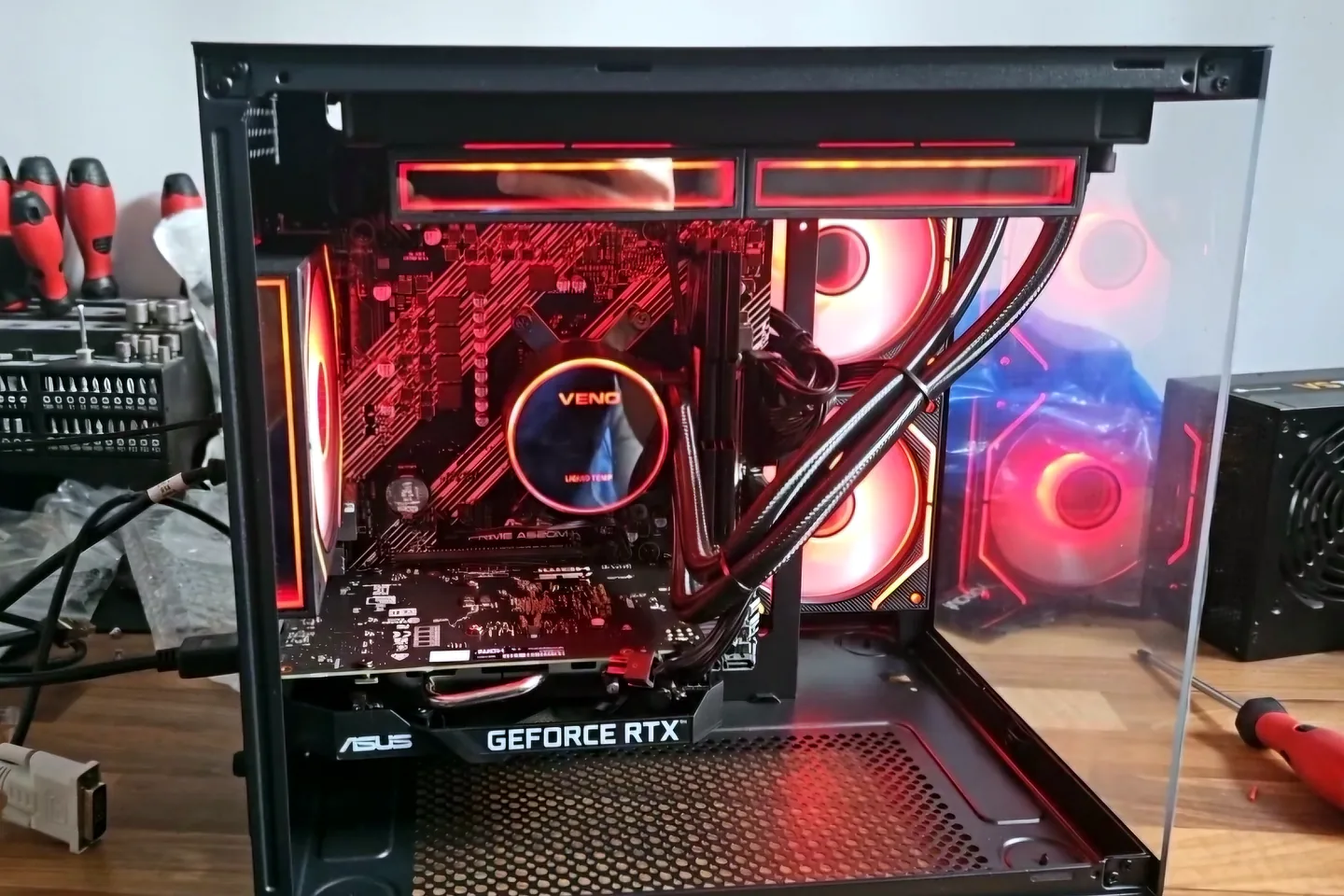
The hero photograph at the top of this guide shows a gaming PC on the PC Repair Guru bench with the liquid cooler removed, thermal compound visible on the CPU and cold plate, and the radiator assembly laid out for inspection. That image is useful because it shows the two separate parts of the cooling path: the interface between CPU and cold plate, and the cooling hardware that must move the heat away.
From a photograph alone, it would be wrong to claim that the paste or the cooler caused the fault. In the workshop, the decision comes from the machine's symptoms, temperature behaviour, pump or fan operation, mounting, dust, airflow and repeat testing. That is the same diagnosis-first approach we recommend before buying parts.
When professional diagnosis makes sense
Book hands-on diagnosis when the gaming PC repeatedly reaches its thermal limit, throttles badly, shuts down, has a suspected pump fault, produces unusual mechanical noise, or still overheats after safe airflow and software checks.
- Do not open a power supply to investigate heat or fan behaviour.
- Stop repeated load testing after shutdowns, burning smells or visible electrical damage.
- If you are not confident removing a cooler, avoid disturbing the CPU socket or mounting system.
- Keep important data backed up before extended stability testing or firmware changes.
For cooling-specific faults, see our PC overheating repair in Birmingham. For crashes, poor gaming performance or broader hardware instability, use our gaming PC repairs in Birmingham. If the underlying component is not clear, start with PC repair in Birmingham so the system can be tested before parts are replaced.
Official technical sources used for this guide
Temperature limits and cooler requirements vary by processor. These manufacturer references support the diagnostic approach above:
Frequently asked questions
Can thermal paste fix an overheating gaming PC?
It can help when heat transfer between the CPU and cooler is poor because the paste is contaminated, disturbed, badly applied or the cooler has been removed. It will not fix a failed pump, blocked radiator, weak airflow or an undersized cooler.
How do I know if my CPU cooler is failing?
Look for a new temperature rise, thermal throttling, shutdowns, abnormal fan or pump behaviour, or temperatures that climb rapidly under a repeatable load. The cooler, mounting, airflow and CPU limits should be checked together.
Should I upgrade my CPU cooler for gaming?
Upgrade when the existing cooler is not suitable for the processor, cannot hold acceptable temperatures under the intended workload, is excessively noisy at the required fan speed, or has a confirmed fault. Do not upgrade only because the case feels warm.
How often should gaming PC thermal paste be replaced?
There is no universal calendar interval. Replace it when the cooler is removed, the thermal interface is contaminated or damaged, or diagnosis points to poor contact. Temperature history and cooler condition matter more than age alone.
Can poor case airflow make a good CPU cooler look bad?
Yes. A CPU cooler can only transfer heat into the air available inside the case. Restricted intake, blocked filters, poor fan direction or hot recirculated air can raise CPU and GPU temperatures even when the cooler itself is working.
Can PC Repair Guru diagnose gaming PC overheating in Birmingham?
Yes. We can check CPU and GPU temperatures, cooler mounting, thermal material, fan and pump operation, case airflow and system stability before recommending cleaning, paste replacement or a cooler upgrade.